Vim setup
documenting for myself
Sophia syntax highlighting
todo. it's on github somewhere, not hard to find
fuzzy finding plugin
this is annoying and requires like 10 minutes of setup.
BUT this is super helpful in huge repositories such as the node codebase
sudo apt install bat fd-find fzf ripgrep
(devuan excalibur)
ripgrep is optional, craig, but the vim plugin needs it if you want to search for regexes inside files
say you're trying to quickly remember what the fuck gmser_id:id() is. Like is
that the record or is that the 33-byte tagged public key? I can't remember and
neither can you
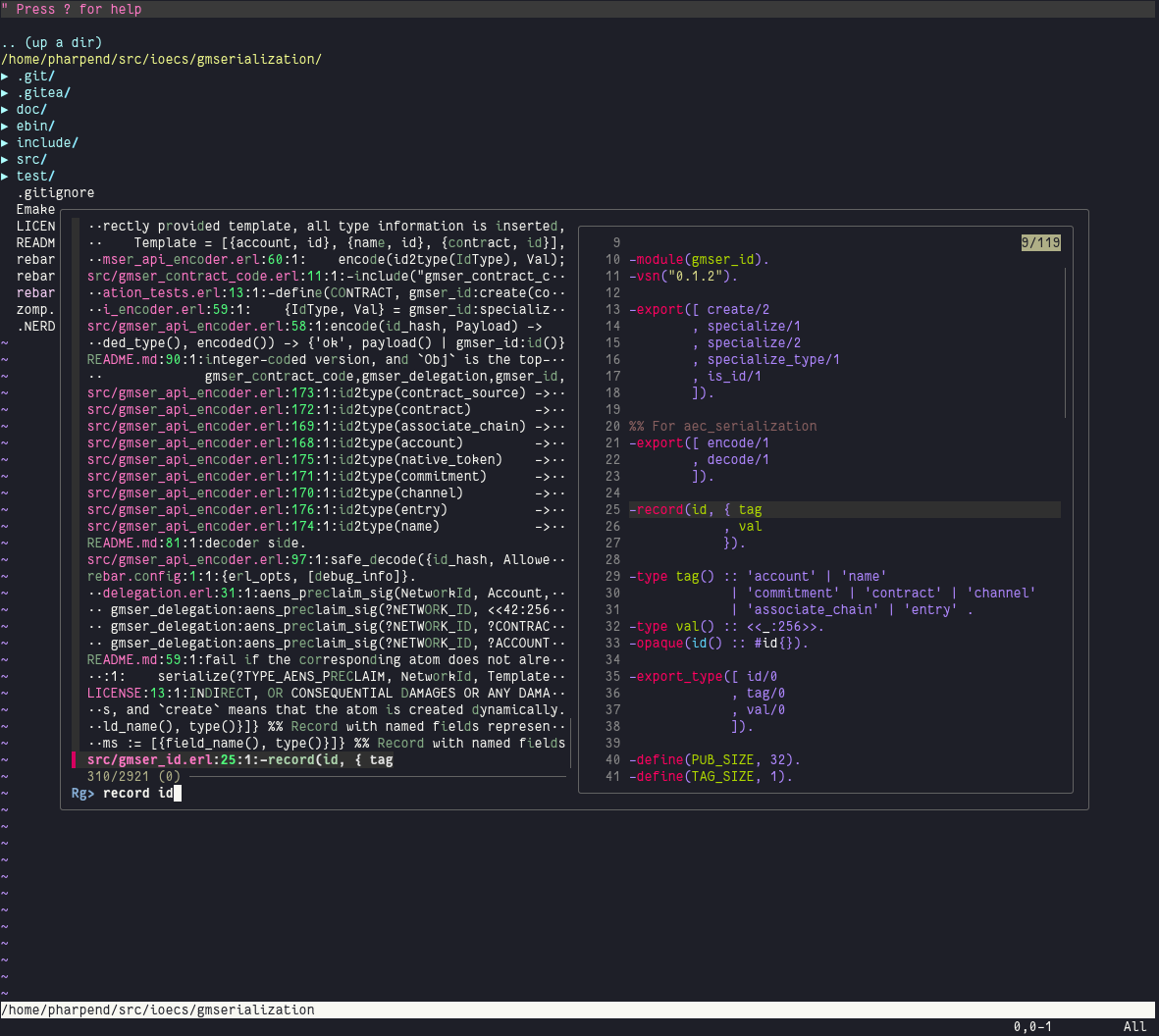
this saves you like 15 seconds and a bunch of context switching. each time
the plugin is super annoying to install but basically don't follow any of the
instructions in the repo. just clone the fzf.vim repo on github (google) to
~/.vim/bundle/fzf.vim.
you also need to tell vim to load the .vim file that ships with the package
[pharpend@picklet ioecs/GajuDesk master] % dpkg -L fzf
/.
/usr
/usr/bin
/usr/bin/fzf
/usr/bin/fzf-tmux
/usr/share
/usr/share/doc
/usr/share/doc/fzf
/usr/share/doc/fzf/README-VIM.md.gz
/usr/share/doc/fzf/README.Debian
/usr/share/doc/fzf/README.md.gz
/usr/share/doc/fzf/changelog.Debian.amd64.gz
/usr/share/doc/fzf/changelog.Debian.gz
/usr/share/doc/fzf/changelog.gz
/usr/share/doc/fzf/copyright
/usr/share/doc/fzf/examples
/usr/share/doc/fzf/examples/completion.bash
/usr/share/doc/fzf/examples/completion.zsh
/usr/share/doc/fzf/examples/fzf.vim
/usr/share/doc/fzf/examples/key-bindings.bash
/usr/share/doc/fzf/examples/key-bindings.fish
/usr/share/doc/fzf/examples/key-bindings.zsh
/usr/share/doc/fzf/examples/plugin
/usr/share/fish
/usr/share/fish/vendor_functions.d
/usr/share/fish/vendor_functions.d/fzf_key_bindings.fish
/usr/share/man
/usr/share/man/man1
/usr/share/man/man1/fzf-tmux.1.gz
/usr/share/man/man1/fzf.1.gz
/usr/share/doc/fzf/examples/plugin/fzf.vim
last file there. put that file at ~/.vim/autoload/fzf.vim
should just work.
:Filesopens the fuzzy file finder:Rgis the interactive grep thing shown above
i have this vimrc:
let $FZF_DEFAULT_COMMAND = 'fdfind --type f'
noremap <C-e> :Files<CR>
noremap <C-r> :Rg<CR>
the fdfind thing means fuzzy find doesn't surface files in your .gitignore
(e.g. beam files, _build insanity)
will try and see